Is there a definitive solution for your company s IT?
Let us face the facts: today, virtually every company depends on information technology to operate. Any interruption in the system — even for minutes — means costs, undelivered orders, idle employees and unhappy customers.
Interruptions typically occur in three areas:
- Hardware — the server or workstation has reached the end of its useful life, or needs additional capacity.
- Software — an application crashed, the operating system failed, or an update broke compatibility.
- Connectivity — internet access failure or loss of communication with a remotely hosted system.
In any of these scenarios the consequence is the same: downtime, inaccessible data and financial loss — without even considering virus attacks, file loss or intentional actions by staff.
The real problem

The technology industry adopted a model where products and systems are designed to become obsolete within a few years. Think about it: today the useful life of a simple household appliance like a refrigerator is 3 to 5 years. Why? Because products have been redesigned to wear out quickly.
It was not always this way. In Brazil you can still find refrigerators and stoves from the 1960s — brands like Cosmopolita and Philco — running to this day. This is our working philosophy: we build systems to last.
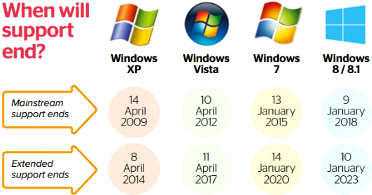
When a three- or four-year-old server fails, it is common to discover that replacement memory or disks are no longer available. The situation is worse with operating systems such as Windows: the system is tied to the hardware where it was installed, and swapping the machine may require a full reinstallation — with real risk of incompatibility between versions, activation keys, libraries and legacy applications.
Many companies still depend on Windows versions that Microsoft itself has discontinued. The main problem is not the lack of support — it is the incompatibility with new hardware, which no longer provides drivers for older systems.
The Telme approach
Telme designed its platform with a different concept: systems built to last — harnessing the power of current hardware on a stable, portable and resilient foundation.
Our approach rests on three pillars:
1. Virtualisation
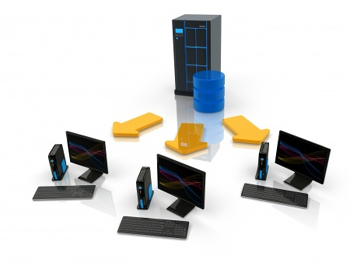
Instead of installing systems directly on hardware, Telme uses virtual machines. Each operating system runs as an isolated instance within a dedicated host.
The advantage is tangible: if the hardware fails, the virtual machine can be transferred to another device — even one of a different brand and configuration — without reinstallation, reconfiguration or data loss.
Well-known commercial virtualisation solutions exist, such as VMware and Microsoft Hyper-V. The problem with these platforms is that, while they address guest portability, the host remains a version of Windows or Linux — inheriting all the stability, licensing and obsolescence issues mentioned above.
With Linux there is an additional concern: the kernel changes frequently, and version upgrades can require a complete reinstallation of the host — resulting in hours or days of downtime. The lack of long-term kernel stability and the scarcity of specialised professionals make Linux a risky choice as a hosting platform for critical production environments.
Telme uses a Unix/BSD operating system — developed at the University of California, Berkeley, with over four decades of continuous evolution, renowned for its reliability and portability. Unlike Windows and Linux, Unix/BSD maintains long-term compatibility and is not subject to the same commercial pressures driving planned obsolescence.
2. Diskless operation
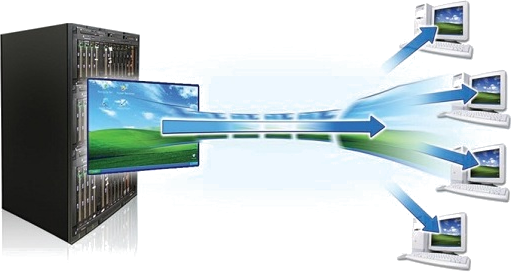
User workstations operate without a local hard drive. The operating system is loaded over the network from the server, but uses the local machine s resources (CPU, memory, video) — unlike a thin client, which merely emulates a remote session with limited performance.
In practice, the user notices no difference. But the benefits are significant:
- No local installations — all applications and services reside on the server
- No individual licences — a single instance serves all workstations
- Instant replacement — if a machine fails, simply connect another to the network, any brand or model, with zero configuration
- Security — no data is stored on the workstations; everything is protected on the server
3. ZFS storage and snapshots
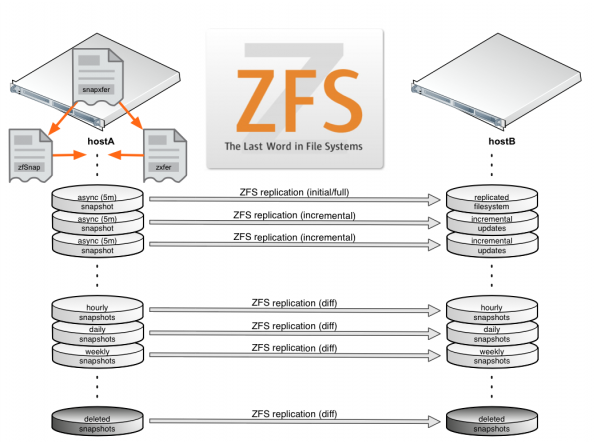
Telme uses ZFS as its file system — an enterprise-grade technology that combines mirroring (local and remote), replication, integrity verification and snapshots in a single system.
With snapshots you can access the complete state of your data at any point in the past — without stopping the server and without relying on traditional backup. We call it "time travel": if your company needs to recover a file from weeks ago, or restore a database as it was on a specific date, it is done in minutes.
In the event of a complete data-centre disaster, replicated data on a remote server allows operations to resume within hours.
The Telme Platform

Integrate storage, virtualisation, e-mail, websites, telephony, databases and more — on a single platform.
On a single server, the Telme Platform delivers:
- Internet: load balancing across multiple connections with automatic failover
- Firewall: access control with selective site blocking per user
- DHCP and DNS: control of devices connected to the network
- VPN: encrypted connections between headquarters, branches and remote sites
- Corporate e-mail: private server with IMAP, encryption and webmail
- Web hosting: HTTP/HTTPS server for company websites and applications
- Database hosting: PostgreSQL, MySQL and others for ERP and CRM systems
- Private cloud storage: file and folder access with controlled sharing
- Virtualisation: virtual machines running any operating system
- Remote desktops: remote access via desktop or VPN
- Diskless operation: workstations without disks, booting over the network
- ZFS with snapshots: automatic local and remote replication with temporal recovery
- Access control: per-user, per-folder permissions based on hierarchy
- Printers, scanners and cameras: available on the network without local drivers
- IP telephony and unified communications:
- Local and remote IP extensions, no PBX hardware required
- Call recording
- IVR for customer service
- Call queues and conference rooms
- Automatic provisioning of IP phones and ATAs
- Monitoring: integration with IP cameras and DVR
- Technical support: by phone and on-site, for the entire platform